Resize the artwork first, then place the QR code
At 540 pixels, both software readers recovered the complete URL from 48 of 48 files when the QR was inserted last, compared with 16 of 48 files made by resizing completed artwork.
A controlled comparison of fictional campaign URLs and raster exports, conducted in October 2026.
Abstract
Set the artwork’s delivery dimensions before placing its QR code, then check the saved file. In our controlled software test at 540 × 540 pixels, both readers recovered the complete URL from all 48 files prepared with the QR inserted at the final size. They recovered 16 of 48 files made by resizing artwork that already contained the QR. Every matched pair kept the same URL and encoded grid.[1]
The comparison used 12 fictional URLs across two error-correction levels and two file formats. The result supports a specific export workflow, not a universal minimum QR size or a phone-scanning guarantee. At 360 pixels, 24 of 48 final-insertion conditions could not fit the fixed area. Of the 24 files that could be prepared, 18 passed both readers and six did not. For businesses and creators, the practical output is a handoff that preserves the full campaign URL and identifies the exact delivery files to verify.
A business approves a creator’s event graphic. The large artwork looks finished, and its QR code returns the right link. A smaller version is then exported for another placement. The destination has not changed, but the file a reader receives has.
That last production step is easy to overlook when the design, offer and campaign link are already signed off. It also creates a concrete question: should a team resize the finished graphic, or resize the background first and place the QR code afterward?
We tested those two workflows with complete fictional campaign URLs, including versions with attribution parameters. The useful finding is a change to the export brief: keep the intended link, make room for its code at the final size and verify that delivered file.
The export order changes the pixels a reader receives
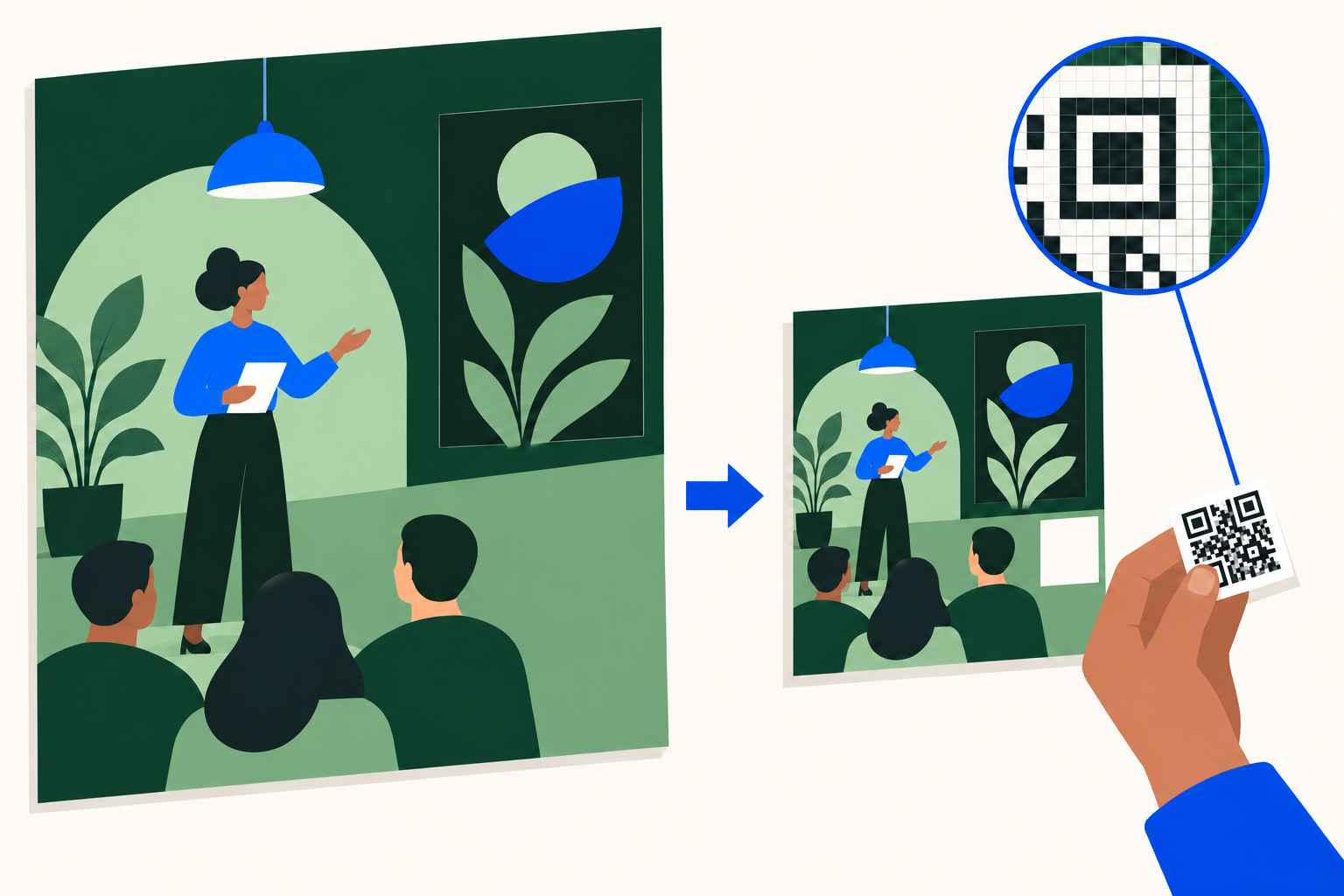
- Background at source size
- Artwork at delivery size
- QR placed afterward
A readable master did not guarantee a readable export
We began with 12 fictional campaign URLs. Four destinations represented a workshop, a creator’s book, a product and a photography class. Each had a short version, a version with campaign parameters and a longer version with additional parameters. Within every workflow comparison, the complete URL stayed unchanged.
Each URL was encoded at two error-correction levels and saved in two formats. That gave us 48 files for each export workflow at each artwork size. These are repeated conditions applied to 12 URLs, not 48 customers, campaigns or independent trials. Both software readers successfully decoded all 24 large source images before the export comparison began.[1]
The difference was clearest at 540 × 540 pixels. When we resized the completed artwork, both readers recovered the exact URL from 16 of 48 files. When we resized the background first and then inserted the QR code at the final size, both readers recovered all 48. The improvement appeared with both error-correction levels and in PNG and JPEG.
The QR code had the same reserved area in each pair: a 90 × 90 pixel square. The second workflow fitted the code to that area using whole pixels for its small squares. It did not shorten the link, remove campaign parameters or switch the destination. The table shows where the four groups of 12 files landed.
For a business commissioning creative work, this changes what to ask the designer to deliver. A source file that opens correctly and a QR code that works in the large master are useful checks. The smaller artwork still needs its own check. Approval should name the actual delivery dimensions and file, rather than stop at the master.
At 540 pixels, the final-insertion recipe recovered more complete URLs
Files recovered by both software readers, out of 12 different URLs in each row. Every file had a 90 × 90 pixel reserved QR area.
| Error-correction level and saved format | Resize completed artwork | Insert QR at final size | Files tested per workflow |
|---|---|---|---|
| M · PNG | 5 | 12 | 12 |
| M · JPEG quality 85 | 5 | 12 | 12 |
| H · PNG | 3 | 12 | 12 |
| H · JPEG quality 85 | 3 | 12 | 12 |
Keep the full URL and place the QR after resizing
A QR code is a grid of small squares called modules. The link and encoding settings determine the grid. DENSO WAVE, the developer of QR Code, explains that longer data and different error-correction settings can require larger grids. A standard QR code also needs a clear margin, known as the quiet zone, four modules wide on every side.[2][3]
The practical task is to fit that complete grid and margin into the delivered artwork. In our first workflow, the QR was already part of a 2,160 × 2,160 pixel image when the whole image was reduced. The resampling process could blend its edges or place the grid between final pixels. In the second workflow, we reduced the background and then drew the original QR grid directly on whole pixels.
One measured example makes the distinction tangible. The longer workshop URL contained 199 bytes. At error-correction level M, it produced a 57 × 57 module grid. Including the quiet zone, the footprint was 65 modules wide. The original artwork allocated five pixels to each module, making that footprint 325 pixels wide.
Reducing the artwork to 540 pixels projected that footprint onto 81.25 pixels, with 1.25 pixels between module boundaries. Both readers failed to recover the URL from the resulting PNG. Drawing the same grid directly at the final size used one pixel per module and a smaller, 65 pixel footprint. Both readers then recovered the complete URL.
This is a comparison of two complete export recipes. The occupied size, placement and filtering changed together, so the test does not isolate one cause. It does show why “make the source QR bigger” is an incomplete production instruction: in this example, the smaller final symbol was the one the readers recovered.
Keep the intended URL intact while resolving the export. Campaign parameters may be part of an agreed measurement plan. Removing them changes the link being delivered. If a team later considers a managed redirect or shorter destination, that is a separate decision requiring its own destination and attribution checks. Our experiment did not test that alternative.
A practical sequence for the QR handoff
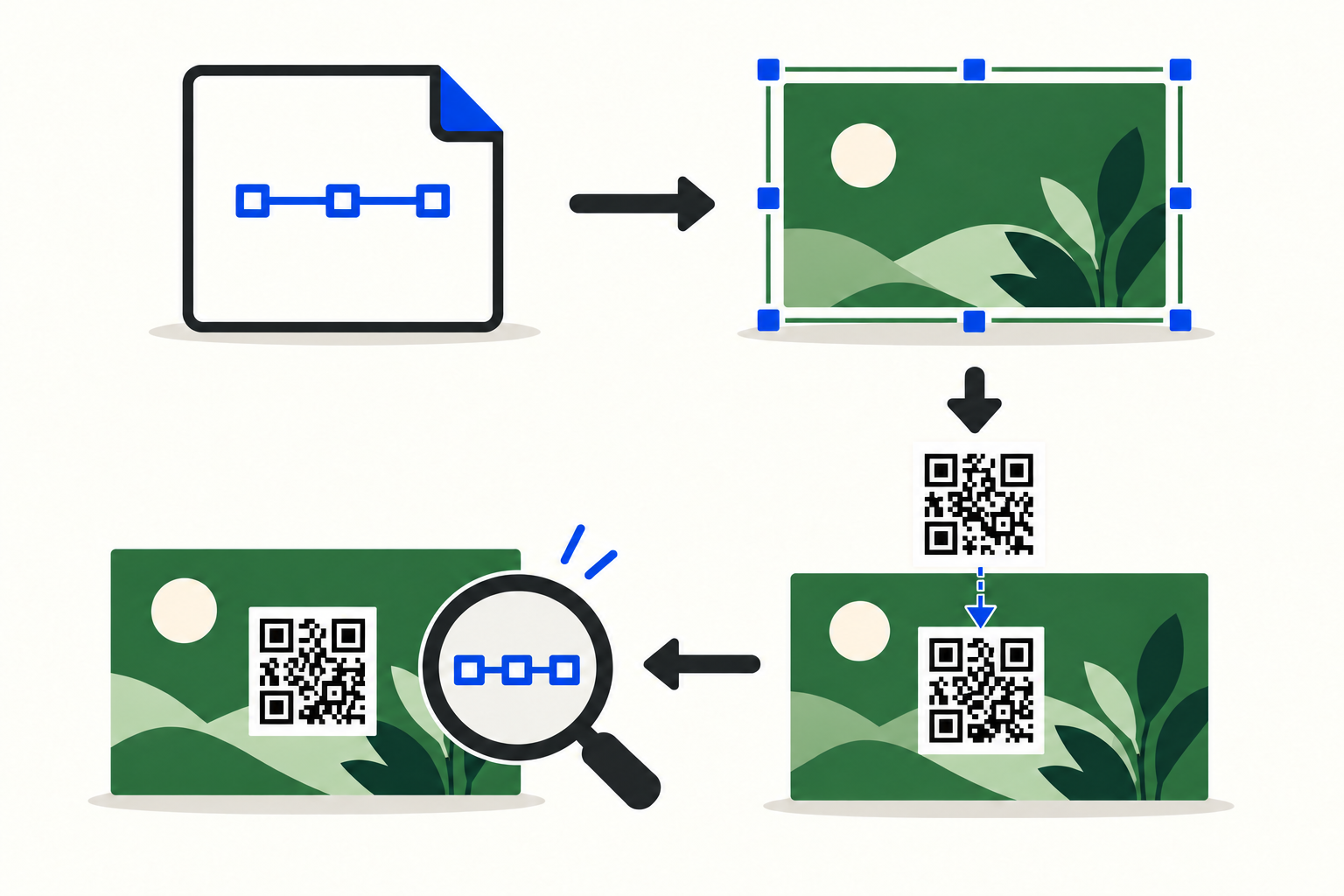
Approve the complete link
Keep the destination and all required campaign parameters together in the brief.
Set the delivery dimensions
Prepare the background at the required width and height before placing the QR.
Place the QR on whole pixels
Fit the encoded grid and its four-module clear margin inside the reserved area.
Check the delivered file
Compare the recovered URL with the approved string and record the file, settings and result.
The smallest reserved box reached a fitting limit
The full size comparison gives the main result a useful boundary. At 1,080, 720 and 540 pixels, every final-insertion file was recovered by both readers. Resizing the completed artwork produced a different pattern: 32, 37 and 16 shared recoveries respectively, from 48 files at each size.
That pattern was not a steady decline as artwork became smaller. The 720 pixel exports had more shared recoveries than the 1,080 pixel exports. Different resizing ratios and resulting pixels can produce different outcomes for a reader. These results do not identify a universal minimum QR code size in pixels.
At 360 pixels, the reserved QR area was only 60 × 60 pixels. Some grids, including their quiet zones, required 65 or 85 modules across. They could not fit even one whole pixel per module. We marked those 24 final-insertion cases as impossible to prepare under the stated recipe, rather than calling them decoder failures.
The table therefore compares only the 24 remaining pairs at 360 pixels. Both readers recovered six resized-artwork files and 18 final-insertion files. Six of the prepared final-insertion files still failed the shared test. The method improved this small set, but did not make every small export work.
For a compact campaign graphic, the next design decision is how much room to reserve for the code and its margin. Do that before treating every available square as interchangeable. The box dimensions, complete URL, encoding and final output all belong in the brief. A one-pixel module that worked in this controlled test is not a recommended size for a phone camera or printed material.
Compare the same prepared files at each delivery size
Exact URL recoveries by both readers. “Files compared per workflow” gives the denominator for each row.
| Square artwork width, in pixels | Resize completed artwork | Insert QR at final size | Files compared per workflow | Pairs excluded: could not prepare |
|---|---|---|---|---|
| 1,080 | 32 | 48 | 48 | 0 |
| 720 | 37 | 48 | 48 | 0 |
| 540 | 16 | 48 | 48 | 0 |
| 360 | 6 | 18 | 24 | 24 |
Error correction and file format need their own checks
Error correction helps a QR reader recover encoded data when some information is damaged. Increasing it can also increase the size of the grid needed for the same content. Our M and H encodings therefore involved a real tradeoff within a fixed area. A higher setting did not simply add protection to an otherwise identical image.[7]
At 540 pixels, resized artwork achieved five shared recoveries out of 12 at M and three at H in each file format. But H was better in other matched cases: eight comparisons involving the detailed URLs at 1,080 pixels, and two campaign-URL PNG comparisons at 720 pixels. “Always choose the lower setting” would misrepresent the results.
File format was not a simple ranking either. At 720 pixels with level M, both readers recovered 10 PNG exports and 12 JPEG exports from the resized artwork. That does not make JPEG a safer general choice. It shows why a result for one saved format should not be carried over automatically to another.
The readers also disagreed on 54 of the 360 generated files. At 1,080 and 720 pixels, ZXing-C++ recovered every file; quirc accounted for the lower shared totals. At 540 pixels, both readers independently improved when the QR was inserted last. We use their agreement as the main outcome while keeping each reader’s results available in the download.
For a creator handing files to a client, the useful response is to specify the intended format and confirm the exact delivered link. A software decode checks the image file. A separate check on the intended phone, screen or printed piece checks another part of the real experience. We measured the former, so the latter remains a practical step for the team using the artwork.
A handoff template for the finished QR artwork
Copy the following fields into a creative brief or delivery note. Complete them for each required output size. They connect the business owner’s destination decision with the designer’s export settings and the person checking the finished material. The downloadable version requires no sign-up and can be adapted to your workflow.
Campaign and use: [Name the campaign, the action the QR should lead to, and where this artwork will appear.] Link owner: [Name the person who can approve the destination and its parameters.] Approved complete URL: [Paste the exact string, including every required parameter and percent escape.]
Final artwork: [Width × height in pixels.] QR area: [Position and reserved width × height.] Quiet zone: [Confirm a clear margin around all four sides.] Grid and fit: [Record the module count and the whole pixels per module used, if available from the generator or export process.]
Encoding and export: [Name the generator, error-correction setting and relevant options.] Preparation order: [State whether the QR was inserted at the final dimensions.] Saved format: [PNG or JPEG, with the settings used.] Delivered file: [Record the filename or another unambiguous file identifier.]
File check: [Name the reader or readers, the file tested and the result.] Recovered URL: [Compare the complete returned string with the approved URL.] Unresolved result: [Record a failure, disagreement or fitting problem and who will resolve it.] Do not replace an untested result with a tick.
Use check: [Name the intended display or printed piece, the phone or other reader used, the responsible person and the date checked.] Destination check: [Confirm that the approved link reaches the intended page and that any required campaign parameters are retained through the planned journey.] These checks extend beyond our image-file benchmark.
The brief should make ownership simple. The campaign owner approves the link; the designer prepares the specified outputs; the reviewer checks the actual files and intended use. If someone changes the link, dimensions or export settings afterward, update the brief and check the affected output again.
A workshop launch, with the handoff filled in
Imagine a business commissioning a creator to promote an autumn workshop. The creator needs a square digital card for a venue screen and a smaller version for a campaign message. The business has approved a link with source, medium, campaign and partner details. This is a fictional production scenario; it uses one of our measured test URLs to make the handoff concrete.
The approved URL is the 199-byte workshop example in the download. Its campaign name is autumn_2026, its medium is qr and its content field identifies a fictional creator partner. Those details stay in the URL for both outputs. The creator does not remove them to reduce the amount of information in the code.
The example delivery note specifies a 540 × 540 pixel PNG, with a 90 × 90 pixel QR region beginning at x=378, y=378. It uses the measured level-M encoding: a 57-module grid, a four-module quiet zone and one whole pixel per module. The final footprint is 65 × 65 pixels, centered within that reserved region.
The designer resizes the background first and inserts that grid afterward. The note identifies the saved file and records the measured result: ZXing-C++ and quirc both returned the exact original URL. It also records the alternative result: neither recovered the URL from the corresponding PNG made by shrinking the completed master. These two results come from our experiment, not a real client campaign.
The business still needs to confirm the actual venue display and the intended phone journey. If the smaller version will be recompressed or resized by another service, the team checks the resulting file or display as well. We have not measured that service, and the original pass does not establish what happens after another transformation.
Suppose the brief later requests a 360 pixel card while keeping the same relative QR area. The box becomes 60 pixels wide, but this code needs 65 modules including its margin. Under our whole-pixel recipe, it cannot be prepared. The designer should flag the layout conflict and agree on more space or a different delivery treatment, rather than report a successful export that was never possible.
That is the value of a specific handoff: the discussion happens while the artwork can still change. The team can retain its approved link, identify which output needs attention and avoid treating a successful large mockup as approval of every later file.
How we compared the export recipes
We fixed the 12 fictional URLs, image layout, sizes and settings before decoding the test exports. The URLs used example.com and were never requested. Four destination families each had three payload profiles, ranging from 39 to 203 bytes. We tested M and H error correction, four square artwork widths and two saved formats, giving 384 planned file conditions across the two workflows.[1]
Segno 1.6.6 generated standard QR codes in byte mode, with automatic error-level boosting disabled. Each URL and correction-level combination was encoded once, and both workflows reused its exact matrix. The source artwork was 2,160 pixels square. Pillow 13.0.0 applied one LANCZOS resize; JPEG used quality 85 with chroma subsampling disabled. All codes were black on white with a four-module quiet zone.[4]
Both readers received the same full saved image converted to 8-bit grayscale. We used ZXing-C++ 3.1.1 and a pinned quirc build with fixed settings. Exact recovery required the original URL bytes, with no conflicting successful result. There were no added crops, enlarged retry images or manual rescue passes. The package preserves the reader settings, per-file geometry and results.[5]
All 24 source masters passed both readers. Of the 384 planned exports, 360 were generated and 24 could not be prepared by the final-insertion recipe. That left 168 matched workflow pairs. We retain every condition, including disagreements, failed prepared files and comparisons favoring either error-correction level. The results describe these synthetic files and software builds, not consumer scanning rates.
Existing guidance already explains the importance of space, quiet zones and image quality. QRotto has also published a comparison of source resolutions after scaling and blur. Our contribution is narrower: a fixed comparison of when the QR is placed within an artwork-export workflow, while the complete URL and encoded matrix stay the same within each pair. The full tables and preparation details are available below.[6]
- Download the English QR export tables (CSV)
- Download the experiment files, methods and QR handoff template (ZIP)
No sign-up required. Technical data and reproduction instructions are in English. The handoff template is provided in all ten article languages. The URLs and campaign examples are fictional.
Sources and notes
- Influence IQ controlled QR export experiment, October 2026. Twelve fictional URLs, two error-correction levels, four artwork sizes, two workflows and two formats produced 384 planned conditions. The package includes every condition, preparation exclusions, native reader results and reproduction instructions. Counts are files or matched conditions, not independent campaigns or people. At 540 pixels, the resized files returned 8/12 in ZXing-C++ and 5/12 in quirc for M/PNG; 9/12 and 5/12 for M/JPEG; and 4/12 and 3/12 for H in each format. Final insertion returned 12/12 in each reader for all four conditions.
- DENSO WAVE, QR Code version and data capacity. Standard QR grids vary with data type, amount and error-correction level. This article uses “module” for one small square in the grid; the clear margin is additional.
- DENSO WAVE, determining the QR code area. The required quiet zone is four modules wide on every side. Printer-specific dot examples are not universal minimum screen-pixel recommendations.
- Segno API documentation. The experiment used make_qr with byte mode, UTF-8 input, boost_error=False and eci=False. Version and mask were chosen once for each URL/error-level combination and then held identical across the two recipes. Detailed file versions, licenses and rendering settings are in the package.
- ZXing-C++ and quirc are software barcode readers. ZXing’s fixed native search options allowed rotation, downscaling and inversion within its single call. The quirc build used the documented nondefault maximum of 65,534 image regions, rather than the default 254, and no flip retry. Each reader ran once per prepared saved image, with no extra rescue passes. Exact versions and options are in the package; these are not stock phone-camera results.
- QRotto, “Online QR Code Generator: What to Check,” October 1, 2026. This prior comparison examines source resolutions after scaling to a common simulated print size and applying blur. It establishes relevant prior work; our study compares two fixed artwork-export recipes rather than claiming the importance of QR image quality is new.
- DENSO WAVE, QR Code error correction. Error correction adds data that can help recover the content; increasing the level can increase the required grid size. Our M/H comparison changes the encoding and grid, rather than isolating protection from image geometry.
All ten language editions describe the same software experiment. Translating the article does not change the measured URLs or establish scanning behavior in another country. The fictional URL strings are preserved exactly.