 Buying guide
Later alternatives for visual planning and multiple Instagram accounts
Later prices depend on your mix of social accounts. Buffer charges per channel; Loomly and Planable offer team review, while Influence handles drafting and publishing.
Facts checked:

Later: The short answer
Later Starter can hold four accounts on four different networks in one social set. Two Instagram accounts plus a Facebook Page and a LinkedIn account need two sets, which moves that setup to Growth. Buffer prices individual channels; Loomly and Planable are alternatives for team review. Influence suits businesses focused on drafting and publishing.
Reasons to keep your current tool
Keep Later if its visual planning, link-in-bio, media organization or review workflow is central to how you work. A lower publishing cost should not leave you rebuilding a useful storefront or approval process.
Our recommendations
One account on each of four networks
Later Starter has enough social-set capacity for this mix. Its other limits still depend on how often you post and who needs access.
Compare the account mixTwo accounts on the same network
Later requires two sets, making Growth the starting plan. Buffer is an alternative with individual channel pricing.
Compare channel-based pricingReviewers decide when content can publish
Loomly and Planable focus on team review. Their included users and required approval stages differ.
Compare calendar and review workThe same four-account total can lead to two different plans
Mix A is one Instagram account, one Facebook Page, one LinkedIn account and one TikTok account. Each uses a different network slot, so one Later set can hold the mix.
Mix B is two Instagram accounts, one Facebook Page and one LinkedIn account. The second Instagram account requires a second set. Starter does not sell extra sets, so this four-account setup needs Growth.
Account mix A
Connected accounts: 4 · Publications each month: 48 · People using the tool: 1
Social set 1
- Instagram 1
- TikTok
Starter · $25Monthly billing · US standard reference
Account mix B
Connected accounts: 4 · Publications each month: 48 · People using the tool: 1
Social set 1
- Instagram 1
Social set 2
- Instagram 2
Growth · $50Monthly billing · US standard reference
Visual planning and approvals can justify a higher price
The checked US monthly prices are $25 for Starter and $50 for Growth. Those tiers differ in users, sets, publishing allowance and collaboration, not just account quantity. Use the annual bill only when you intend to commit for a year.
Moving captions and media to another scheduler leaves the Link in Bio page, approval history and planned feed arrangement behind. Later may remain useful if those are part of your weekly work; the alternative’s posting price does not include rebuilding them.
Later: Which tool suits you?
| Tool | Best suited to | What to keep in mind |
|---|---|---|
| Later | Visual planning across the networks included in a social set. | Starter cannot add extra sets or users; repeated accounts on one network may require Growth. |
| Influence | One business preparing and reviewing posts across its accounts. | Later’s Link in Bio page and visual-grid setup need to stay in Later or be replaced separately. |
| Loomly | Calendar planning for a small team; Starter includes three users. | Starter’s custom-role descriptions conflict on the pricing page. Availability needs confirmation from Loomly. |
| Planable | Teams that need content review and required approvals. | Basic has optional approval; required approval begins at Pro, and analytics and inbox are add-ons. |
| Buffer | Individual channels without social-set bundles. | The per-channel total and Team requirement for approvals still matter. |



Publishing prices for your accounts
One account means one profile or Page. Posting an announcement to five accounts counts as five publications.
These plans cover publishing. Inbox, reporting and approval features differ by plan.
Some plans charge per account, person, brand or social set. A social set can limit how many accounts you can connect on each network. Posts are split evenly across accounts in these examples. Posting more often to one account may require a higher plan.
Standard US prices, excluding taxes, promotions and optional extras. Required extras are included where their prices are available.
Amounts use your selected currency, fixed comparison exchange rates and rounded local prices. Annual totals are the full-year bill.
Publishing price comparison: 4 connected accounts · 48 publications each month · Monthly billing
- Later$25Starter
- Influence$19Starter
- Loomly$65Starter
- Planable$39Basic
- Buffer$24Essentials
The table shows priced plans with enough publishing capacity for these accounts and posts. Features such as team approvals may require a higher tier. Free plans are covered below.
| Matching plan | Total for the billing period | What the plan includes |
|---|---|---|
| LaterStarter | $25billed each month | Accounts in base plan: 8 · People in base plan: 1 US price calculation: Base price: $25 Plan source |
| InfluenceStarter | $19billed each month | Monthly publications included: 50Plan source |
| LoomlyStarter | $65billed each month | Accounts in base plan: 12 · People in base plan: 3 US price calculation: Base price: $65 Plan source |
| PlanableBasic | $39billed each month | Accounts in base plan: 4 · Monthly publications included: 60 US price calculation: Base price: $39 Plan source |
| BufferEssentials | $24billed each month | People in base plan: 1 US price calculation: 4 × $6 = $24 Plan source |
Prices for three common setups
US monthly prices. Each column uses the same accounts, people and number of posts for every tool.
Example 1
- Connected accounts
- 4
- Publications each month
- 48
- People using the tool
- 1
- Businesses or brands
- 1
- Most accounts on one network
- 1
- X accounts within that total
- 0
Example 2
- Connected accounts
- 4
- Publications each month
- 48
- People using the tool
- 1
- Businesses or brands
- 1
- Most accounts on one network
- 2
- X accounts within that total
- 0
Example 3
- Connected accounts
- 4
- Publications each month
- 160
- People using the tool
- 2
- Businesses or brands
- 1
- Most accounts on one network
- 2
- X accounts within that total
- 0
| Matching plan | Example 1 · USD | Example 2 · USD | Example 3 · USD |
|---|---|---|---|
| Later | $25Starter | $50Growth | $50Growth |
| Influence | $19Starter | $19Starter | Price unavailable |
| Loomly | $65Starter | $65Starter | $65Starter |
| Planable | $39Basic | $39Basic | Price unavailable |
| Buffer | $24Essentials | $24Essentials | $48Team |
Later / Influence: The differences that matter
| What you need to do | Later | Influence |
|---|---|---|
| Account structure | A set includes one profile from each supported network, not eight arbitrary accounts. | One business can connect its relevant accounts; output determines the suitable plan. |
| Starter capacity | Starter includes one set, one user and thirty posts per profile per month. | Fifty destination publications fit Starter; more output requires the matching allowance. |
| Repeated networks | Two Instagram accounts require two sets even if several other network slots are unused. | Count each connected account and each planned destination publication. |
| Visual planning | Includes visual planning and Link in Bio features. | Review the supported image or video draft before saving its schedule. |
| Collaboration | Growth lists internal and external collaboration and approvals. | The author reviews the post before publishing; this is not a multi-person approval chain. |
| Additional capacity | Growth and Scale can add sets and users; Starter cannot. | Choose the plan matching monthly output. |
Prices and plan details were checked on the date above. The linked sources list each provider’s current terms. Sources and pricing
Example: introduce a new product color
The product announcement uses approved photos, a confirmed color name and a product URL.
- 1
Select the source photos
Identify the actual product and the image rights. List each account, including repeated Instagram accounts.
Stone Light introduces a blue ceramic mug on 26 October. Approved photos show the actual color. The business has two Instagram accounts and one Facebook Page.
- 2
Prepare destination versions
Give each account the appropriate product photo and caption. The product’s color, availability and link should stay consistent.
Instagram
Meet Stone Light’s blue ceramic mug, arriving on 26 October. Take a closer look at the blue glaze in the product photo.
Facebook
Stone Light introduces its blue ceramic mug on 26 October. Take a look at the blue glaze in the product photo.
- 3
Review the presentation
Check the crop, color description, link and account. Keep any required client approval in its proper system.
Check the selected Instagram account, blue glaze, release date and product link. The second Instagram account needs its own draft and schedule.
- 4
Save publication times
Choose the date, time and time zone, then check that each post appears in Upcoming.
Scheduled for 22 October 2026, 09:00 Asia/Bangkok (02:00 UTC), with one post for each selected account.
- 5
Verify the result
Read the later delivery status and inspect the destination when available. Maintain the product-link experience separately.
At 09:05, the first account shows Published and the second shows Needs review. Check the second account’s existing result before sending again to avoid a duplicate.
 Instagram
See the steps in Influence
Screenshots from an example workspace with fictional data. The interface is shown in English.
1. Edit the text and check the preview
Edit the text beside the selected account’s preview. Saving a draft leaves it available for more changes.
Open full-size screenshot (new tab)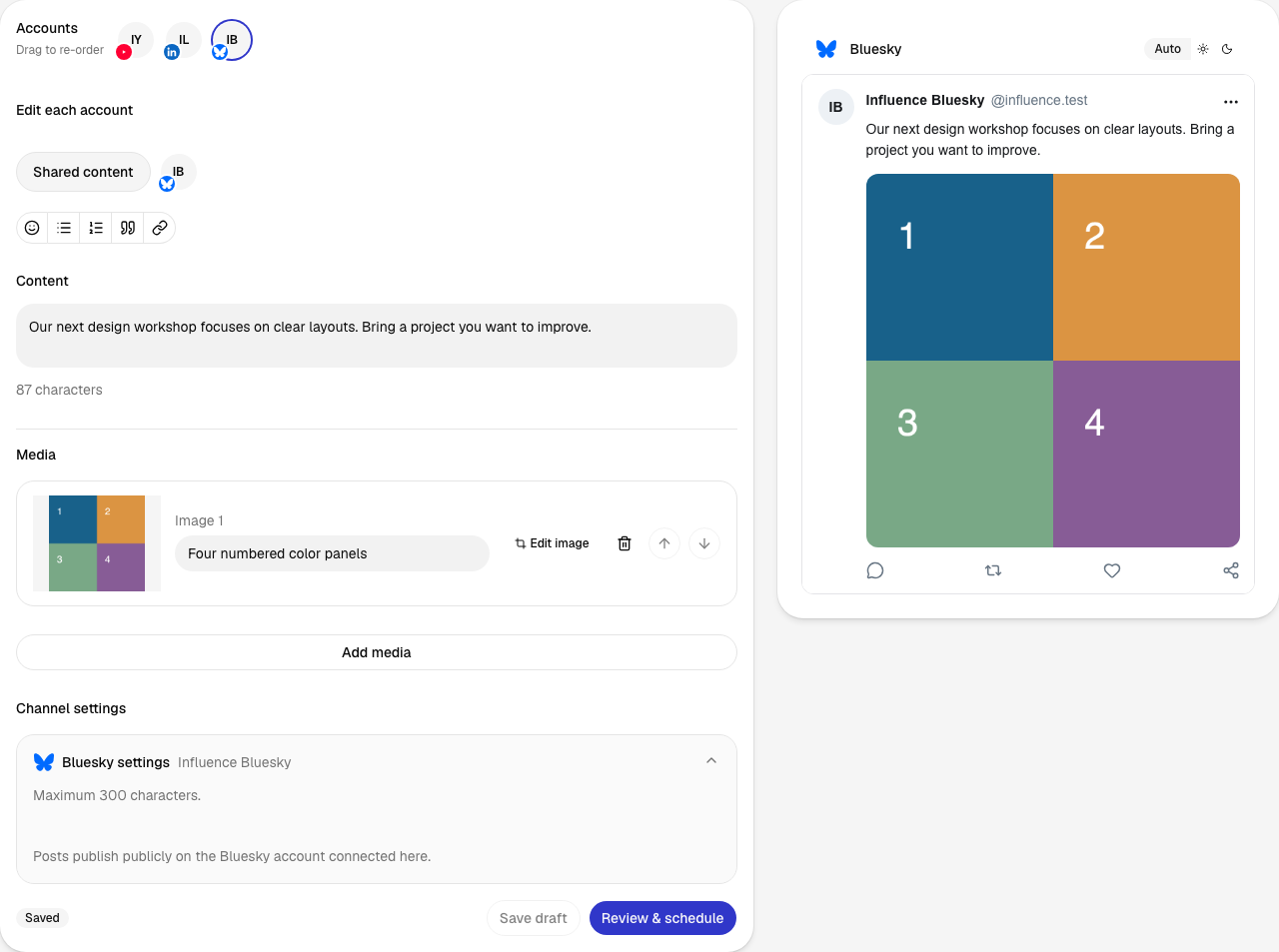
2. Review before approving
The review brings the account, post, date, time and time zone together. Confirm schedule saves this version for the chosen time.
Open full-size screenshot (new tab)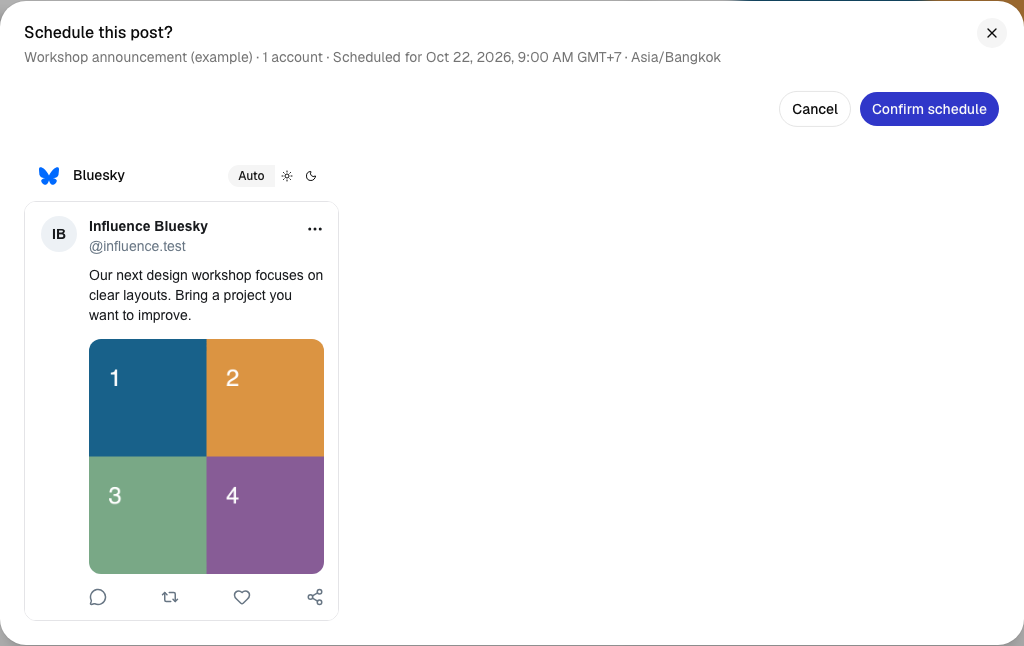
3. Find the scheduled post
The calendar shows when each post is due. Its status changes as publishing progresses; Activity shows the later delivery result.
Open full-size screenshot (new tab)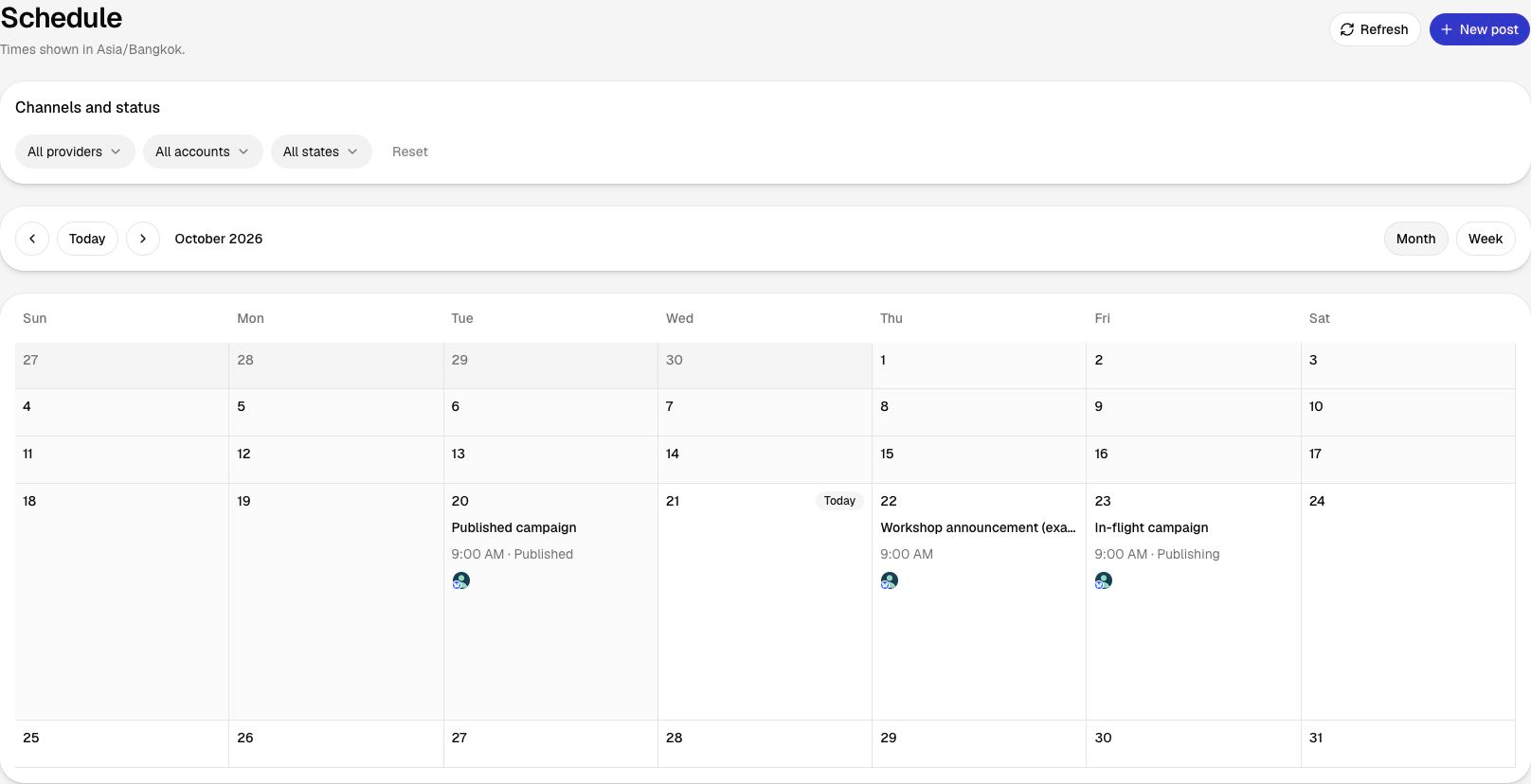
What carries over when you switch?
Moving scheduled posts does not move your Link in Bio page. Its content and links need a separate handover.
- List your exact account mix, future posts and approved media.
- Export information you need to retain from reports and links.
- Recreate one draft and check the crop, destination and time zone.
- Assign that item to one scheduler and remove the duplicate.
- Verify delivery before moving the rest of the calendar.
Link-in-bio pages, historical analytics, approval history and visual-grid arrangements do not transfer automatically.
See the publishing workflow
The current signup requires a card before the seven-day trial. Charging starts after the trial under the selected plan's terms.
Questions before you switch
Is a Later social set eight interchangeable accounts?
No. The current set includes one account for each supported network. Two accounts on one network use two sets.
Can I buy a second set on Starter?
The checked pricing page says extra sets and users are not available on Starter. Growth includes two sets and supports add-ons.
Will my link-in-bio page move to Influence?
Your link-in-bio page needs to stay with Later or be recreated elsewhere. Switching your publishing tool does not move that page.
Later: Sources and pricing
Prices and plan details were checked on the date above. The linked sources list each provider’s current terms.
- Later: Pricing and plan details ·
- Loomly: Pricing and plan details ·
- Planable: Pricing and plan details ·
- Buffer: Pricing and plan details ·
Compare other tools
Related alternatives and their prices, features and switching considerations.