 Buying guide
Buffer alternatives: pricing for 3, 5 and 10 accounts
Buffer costs less in our three- and five-account examples. At ten accounts and 120 monthly posts, Influence Growth costs $21 less. Publer, Metricool and Later offer other trade-offs.
Facts checked:

Buffer: The short answer
Buffer Free is a good option for up to three channels if you can refill its queue as posts go live. Buffer Essentials is cheaper than Influence in the three- and five-account examples below. At ten accounts and 120 monthly posts, Influence Growth is $39 versus Buffer Essentials at $60, using US monthly prices.
Reasons to keep your current tool
Buffer is worth keeping if its free queue, post formats or community features suit you. Its AI Assistant and API are available even on Free, so you do not need to switch just to get assistant access.
Our recommendations
Three channels and a queue you can refill
Buffer Free can cover this setup, with ten queue slots per channel and no subscription charge.
Read about Buffer FreeTen accounts and one hundred twenty posts
Influence Growth costs $39 versus $60 for Buffer Essentials at the US monthly rates shown here.
Inspect the publishing workflowRecurring content and RSS drive the work
Publer supports RSS on Professional; Business adds recycling features. It is a closer option when those automations are essential.
Compare queue and automation choicesBuffer costs less at three accounts; Influence costs less at ten
At three accounts and twelve posts per account, the total is thirty-six destination publications. Buffer Essentials is $18 per month; Influence Starter is $19 at the checked US reference prices. Buffer is $1 less.
At five accounts the same cadence produces sixty publications. Buffer Essentials is $30; Influence needs Growth at $39. At ten accounts and one hundred twenty publications, Buffer is $60 and Growth is $39. The result changes because the tools count different things.
Buffer Free’s queue refills as posts go live
A queue holds future posts waiting to publish. Buffer Free allows ten waiting posts per channel, and each published item frees a slot. Thirty-six posts across three accounts in a month may fit Free if you refill the queue and its features are sufficient.
Free also has a lifetime limit of eight distinct channel connections. Repeatedly disconnecting and reconnecting different client accounts is therefore not an unlimited workaround. For paid plans above ten channels, use the current volume tiers rather than extending $6 forever.
Buffer: Which tool suits you?
| Tool | Best suited to | What to keep in mind |
|---|---|---|
| Buffer | A small free queue or a paid plan for a solo publisher. | Paid pricing counts each channel; team approvals belong to Team. |
| Influence | One business publishing across several accounts on a monthly allowance. | The publication allowance matters: sixty destination posts exceed Starter. |
| Publer | Queued posts, RSS feeds and recurring content. | AI, analytics and API/MCP access are listed on Business rather than Professional. |
| Metricool | Publishing with brand analytics and reports. | A brand slot is not an arbitrary bundle of accounts; X is a paid add-on. |
| Later | Visual planning and a link-in-bio page. | A social set permits one account per supported network; repeated accounts on one network require more sets. |



Publishing prices for your accounts
One account means one profile or Page. Posting an announcement to five accounts counts as five publications.
These plans cover publishing. Inbox, reporting and approval features differ by plan.
Some plans charge per account, person, brand or social set. A social set can limit how many accounts you can connect on each network. Posts are split evenly across accounts in these examples. Posting more often to one account may require a higher plan.
Standard US prices, excluding taxes, promotions and optional extras. Required extras are included where their prices are available.
Amounts use your selected currency, fixed comparison exchange rates and rounded local prices. Annual totals are the full-year bill.
Publishing price comparison: 3 connected accounts · 36 publications each month · Monthly billing
- Buffer$18Essentials
- Influence$19Starter
- Publer$12Professional
- MetricoolPrice unavailable
- Later$25Starter
The table shows priced plans with enough publishing capacity for these accounts and posts. Features such as team approvals may require a higher tier. Free plans are covered below.
| Matching plan | Total for the billing period | What the plan includes |
|---|---|---|
| BufferEssentials | $18billed each month | People in base plan: 1 US price calculation: 3 × $6 = $18 Plan source |
| InfluenceStarter | $19billed each month | Monthly publications included: 50Plan source |
| PublerProfessional | $12billed each month | People in base plan: 1 US price calculation: ($12 + 0 × $2) = $12 Plan source |
| Metricool | Price unavailable | Public pricing does not cover this combination of accounts, people and posts. A provider quote is needed.Plan source |
| LaterStarter | $25billed each month | Accounts in base plan: 8 · People in base plan: 1 US price calculation: Base price: $25 Plan source |
Prices for three common setups
US monthly prices. Each column uses the same accounts, people and number of posts for every tool.
Example 1
- Connected accounts
- 3
- Publications each month
- 36
- People using the tool
- 1
- Businesses or brands
- 1
- Most accounts on one network
- 1
- X accounts within that total
- 0
Example 2
- Connected accounts
- 5
- Publications each month
- 60
- People using the tool
- 1
- Businesses or brands
- 1
- Most accounts on one network
- 1
- X accounts within that total
- 0
Example 3
- Connected accounts
- 10
- Publications each month
- 120
- People using the tool
- 1
- Businesses or brands
- 1
- Most accounts on one network
- 2
- X accounts within that total
- 0
| Matching plan | Example 1 · USD | Example 2 · USD | Example 3 · USD |
|---|---|---|---|
| Buffer | $18Essentials | $30Essentials | $60Essentials |
| Influence | $19Starter | $39Growth | $39Growth |
| Publer | $12Professional | $20Professional | $36Professional |
| Metricool | Price unavailable | Price unavailable | Price unavailable |
| Later | $25Starter | $25Starter | $50Growth |
Prices for 3, 5 and 10 accounts
US monthly prices for one business, one person and twelve posts per account.
| Connected accounts | Publications each month | Buffer Essentials | Influence |
|---|---|---|---|
| 3 | 36 | $18 | $19 · Starter |
| 5 | 60 | $30 | $39 · Growth |
| 10 | 120 | $60 | $39 · Growth |
- Buffer Essentials is $1 cheaper. Buffer Free can also cover this setup if ten queue slots per channel are enough.
- Buffer is $9 cheaper. Sixty publications exceed Influence Starter’s monthly allowance.
- Influence costs $21 less for ten accounts and 120 monthly posts.
Buffer Free includes three channels with ten queued posts per channel. Each published post frees a queue slot, so you can post more than ten times a month by refilling it. The lifetime connection limit is eight distinct channels. The paid examples use Essentials.
Buffer includes its AI Assistant and API on the Free plan.
Buffer · Plan sourceBuffer / Influence: The differences that matter
| What you need to do | Buffer | Influence |
|---|---|---|
| Price unit | One channel is one connected account; paid rates scale with channel count. | The allowance counts publications sent to individual destinations. |
| Small free setup | Free includes three channels and ten scheduled posts per channel at one time. | Paid plans with a seven-day trial; a card is required. |
| Monthly output | The free queue can be refilled after posts publish; ten queued is not ten per month. | Starter includes fifty; Growth includes one hundred fifty destination publications. |
| AI assistance | AI Assistant is available on Free and paid plans. | Prepare content for review using your own facts and assets. |
| API and assistants | API access and assistant integrations are available; request limits differ by plan. | API and assistant publishing require review and confirmation. |
| Team review | Team includes approval workflows and unlimited team members. | The author reviews the post before publishing; this is not a formal team approval chain. |
Prices and plan details were checked on the date above. The linked sources list each provider’s current terms. Sources and pricing
Example: schedule a week of workshop promotion
A workshop announcement uses approved photographs and confirmed event details. Posting it to three accounts counts as three publications.
- 1
Choose the actual destinations
List each account and decide how many reminders it needs. Count account destinations rather than starting documents.
Willow Workshop confirms a bowl-making session on 24 October at 14:00 in Bangkok. Approved photos show a finished bowl and the studio. These are two of three planned destination drafts.
- 2
Prepare the posts
Write an image caption for Instagram and the relevant professional detail for LinkedIn; remove irrelevant text from each version.
Instagram
Make a bowl with Willow Workshop on 24 October at 14:00 in Bangkok. Swipe to see the bowl and studio.
LinkedIn
Willow Workshop is holding a bowl-making session on 24 October at 14:00, Bangkok time. We’ll be making the bowl pictured here.
- 3
Review each destination
Check the date, link, media and supported format. Reusing source material does not eliminate this review.
Check the date, carousel order and booking route. The third planned account needs its own draft and adds another publication.
- 4
Save the schedule
Inspect the saved dates and time zones. If comparing a free queue, check how many future slots remain.
Scheduled for 22 October 2026, 09:00 Asia/Bangkok (02:00 UTC), with one post for each selected account.
- 5
Read the later status
After the scheduled time, check the status and published link for each account.
At 09:05, the first account shows Published and the second shows Needs review. Check the second account’s existing result before sending again to avoid a duplicate.
 Instagram
See the steps in Influence
Screenshots from an example workspace with fictional data. The interface is shown in English.
1. Edit the text and check the preview
Edit the text beside the selected account’s preview. Saving a draft leaves it available for more changes.
Open full-size screenshot (new tab)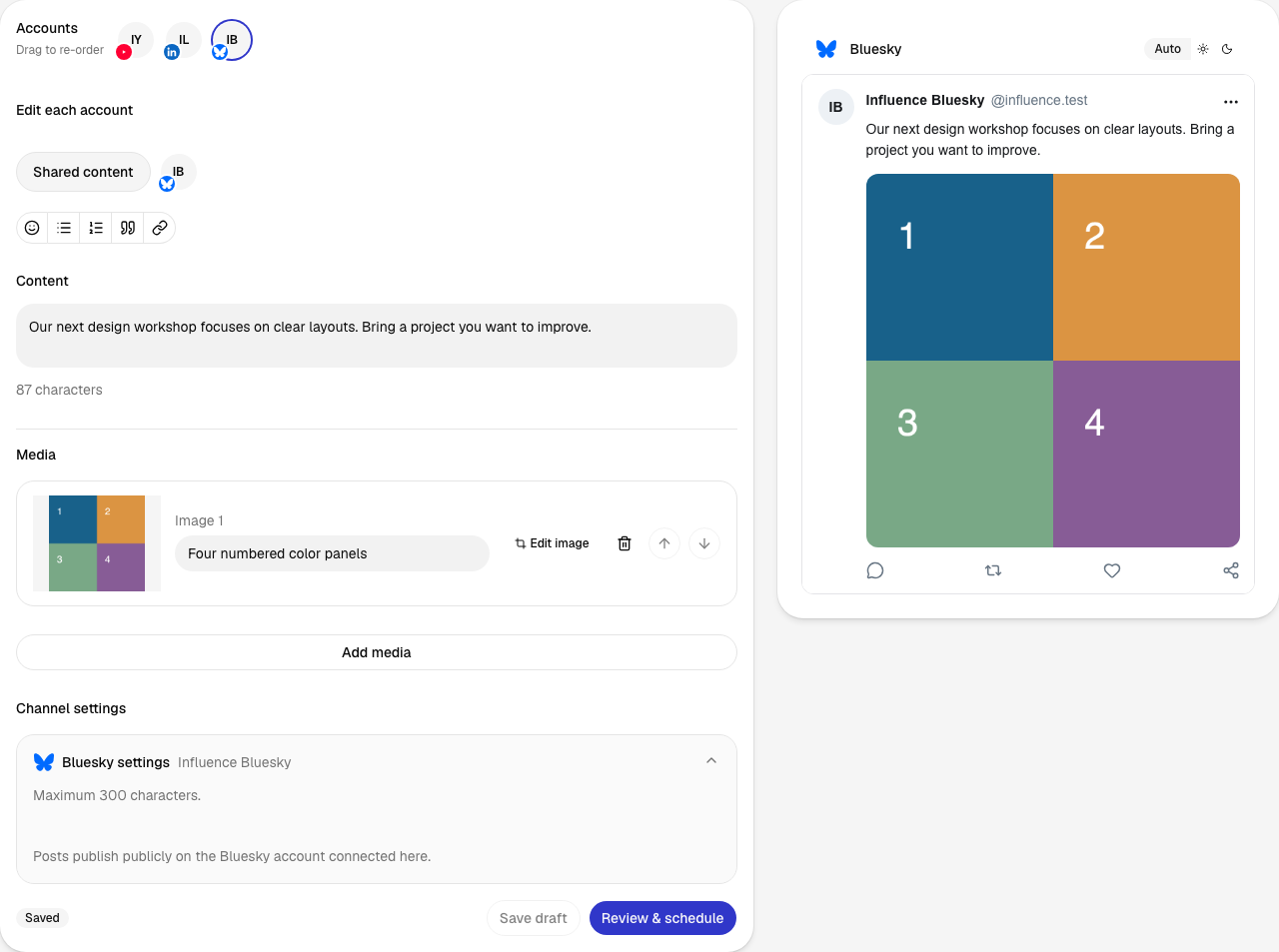
2. Review before approving
The review brings the account, post, date, time and time zone together. Confirm schedule saves this version for the chosen time.
Open full-size screenshot (new tab)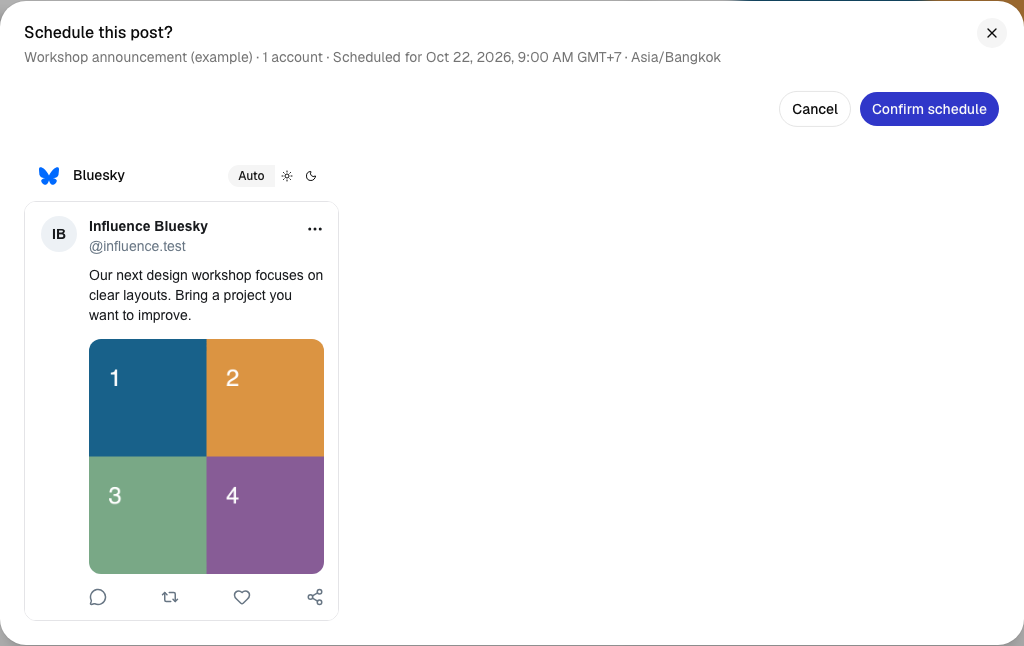
3. Find the scheduled post
The calendar shows when each post is due. Its status changes as publishing progresses; Activity shows the later delivery result.
Open full-size screenshot (new tab)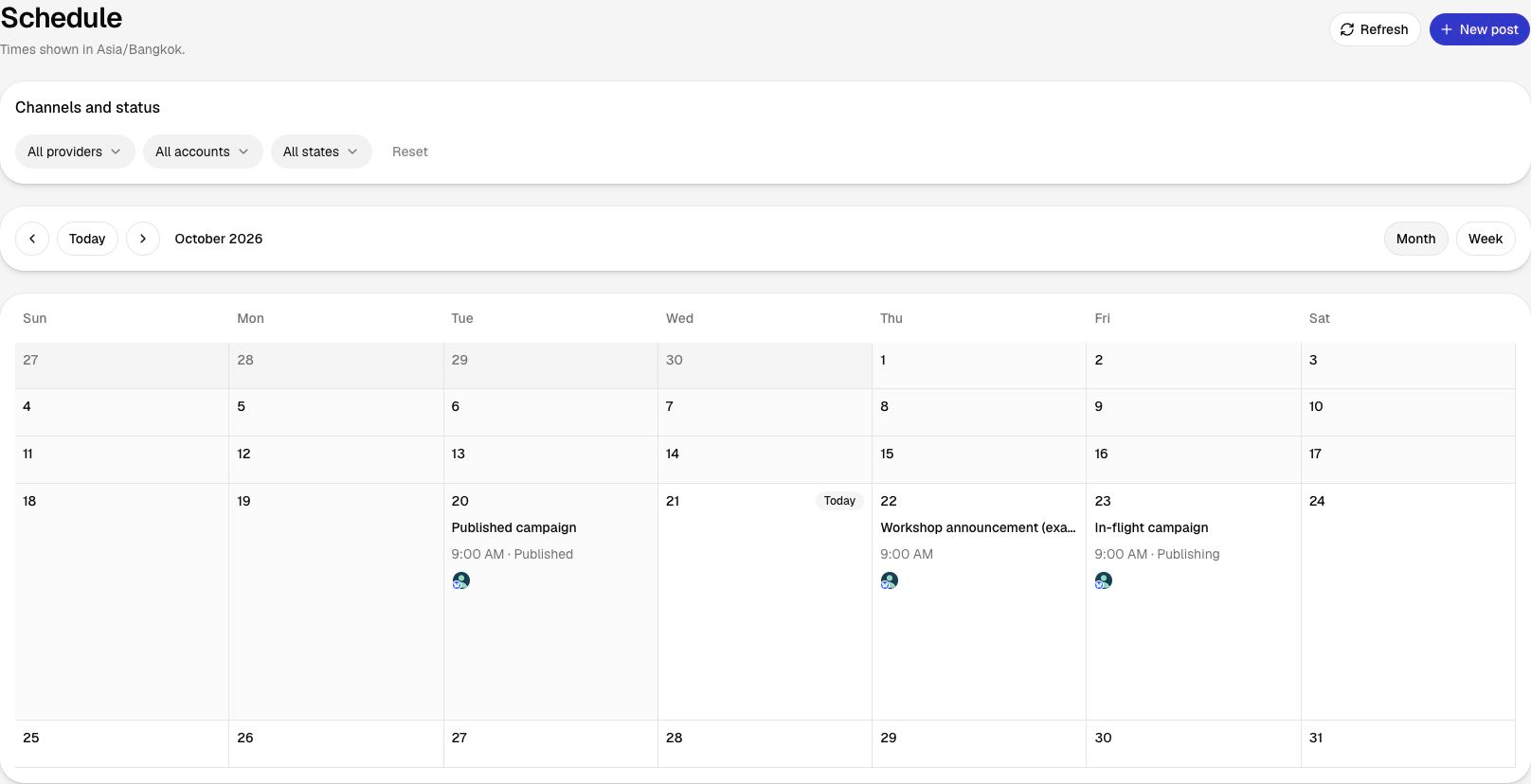
What carries over when you switch?
Move future posts with their media and dates, then remove the old copies from Buffer’s queue.
- Export or list future posts and retain the original media.
- Choose one permitted account for a test draft.
- Check format, time zone, links and the monthly publication count.
- Remove the old scheduled copy before assigning the item to the new scheduler.
- Move the remaining posts only after the test result is clear.
Buffer history, Insights, comments and Start Page configuration do not move automatically when a draft is recreated.
See the publishing workflow
The current signup requires a card before the seven-day trial. Charging starts after the trial under the selected plan's terms.
Questions before you switch
Does Buffer Free allow only ten posts per month?
No. It allows ten scheduled posts per channel at a time. Published posts free queue slots that you can refill.
Does an identical post on five accounts count once?
It counts as five publications in Influence, one for each account. Buffer charges for the five connected channels.
Is Influence always cheaper?
No. Buffer Essentials is cheaper in the checked three- and five-account examples. Influence Growth is cheaper at ten accounts and one hundred twenty monthly publications.
Buffer: Sources and pricing
Prices and plan details were checked on the date above. The linked sources list each provider’s current terms.
- Buffer: Pricing and plan details ·
- Publer: Pricing and plan details ·
- Metricool: Pricing and plan details ·
- Later: Pricing and plan details ·
Compare other tools
Related alternatives and their prices, features and switching considerations.