 Buying guide
CoSchedule alternatives for social posts and marketing calendars
Loomly and Planable focus on content review, SocialBee on recurring posts, and Influence on drafting and publishing. Wider project planning may still need CoSchedule.
Facts checked:

CoSchedule: The short answer
Loomly and Planable are alternatives for social calendars and content review. SocialBee is worth considering for recurring evergreen posts. Influence handles preparing, reviewing and scheduling fresh posts. CoSchedule may still be needed for article deadlines, campaign dependencies and wider project coordination.
Reasons to keep your current tool
Keep CoSchedule when social content belongs inside a broader marketing operation, or when ReQueue is essential to how evergreen content is reused. A separate scheduler only solves the social-publication portion.
Our recommendations
The whole marketing calendar needs replacing
Keep CoSchedule until the replacement covers article deadlines, campaign dependencies and team coordination as well as social posts.
Compare the jobs tools coverThe main need is fresh social content
Influence suits drafting, reviewing and scheduling new posts for a business’s accounts.
See the publishing stepsEvergreen recycling is essential
Publer Business and SocialBee are closer options for recycling evergreen content.
Compare automation requirementsSocial publishing covers only part of a marketing calendar
Social posts need drafts, review, publishing times and delivery checks. A broader campaign also has article deadlines, design tasks and dependencies between people. Moving the posts leaves those responsibilities to be handled elsewhere.
CoSchedule can remain the planning tool while another service handles social publishing. That approach keeps the wider calendar intact, but both subscriptions remain part of the total cost.
Social publishing
- Drafts and media
- Review before sending
- Publication schedule
- Delivery status
Wider marketing work
- Article deadlines
- Design tasks
- Campaign dependencies
- Non-social assets
Add the profiles that the base price leaves out
The checked Starter price is $39 with monthly billing for one user and three non-X profiles. Each additional non-X profile is listed at $5 per month. Five such profiles therefore produce a $49 monthly base-and-profile total.
X costs $16 per profile each month and does not use an included non-X slot. Team approvals or another user can require Professional, even when Starter has enough profile capacity.
CoSchedule: Which tool suits you?
| Tool | Best suited to | What to keep in mind |
|---|---|---|
| CoSchedule | A wider marketing calendar or an existing ReQueue setup. | Starter and Professional include different profile and user counts; X profiles cost extra. |
| Loomly | A small team sharing a social calendar and approvals. | Social calendar and review features do not cover CoSchedule’s wider project coordination. |
| Planable | Content review across several stakeholders. | Optional, required and multi-level approvals use different plans. |
| SocialBee | Recurring categories and evergreen posts. | Accounts, workspaces, people and reporting differ by plan. |
| Influence | Preparing and scheduling fresh social posts. | ReQueue rules and project dependencies do not transfer when posts are recreated. |



Publishing prices for your accounts
One account means one profile or Page. Posting an announcement to five accounts counts as five publications.
These plans cover publishing. Inbox, reporting and approval features differ by plan.
Some plans charge per account, person, brand or social set. A social set can limit how many accounts you can connect on each network. Posts are split evenly across accounts in these examples. Posting more often to one account may require a higher plan.
Standard US prices, excluding taxes, promotions and optional extras. Required extras are included where their prices are available.
Amounts use your selected currency, fixed comparison exchange rates and rounded local prices. Annual totals are the full-year bill.
Publishing price comparison: 3 connected accounts · 36 publications each month · Monthly billing
- CoSchedule$39Starter
- Loomly$65Starter
- Planable$39Basic
- SocialBee$29Bootstrap
- Influence$19Starter
The table shows priced plans with enough publishing capacity for these accounts and posts. Features such as team approvals may require a higher tier. Free plans are covered below.
| Matching plan | Total for the billing period | What the plan includes |
|---|---|---|
| CoScheduleStarter | $39billed each month | Accounts in base plan: 3 · People in base plan: 1 US price calculation: Base price: $39 Plan source |
| LoomlyStarter | $65billed each month | Accounts in base plan: 12 · People in base plan: 3 US price calculation: Base price: $65 Plan source |
| PlanableBasic | $39billed each month | Accounts in base plan: 4 · Monthly publications included: 60 US price calculation: Base price: $39 Plan source |
| SocialBeeBootstrap | $29billed each month | Accounts in base plan: 5 · People in base plan: 1 US price calculation: Base price: $29 Plan source |
| InfluenceStarter | $19billed each month | Monthly publications included: 50Plan source |
Prices for three common setups
US monthly prices. Each column uses the same accounts, people and number of posts for every tool.
Example 1
- Connected accounts
- 3
- Publications each month
- 36
- People using the tool
- 1
- Businesses or brands
- 1
- Most accounts on one network
- 1
- X accounts within that total
- 0
Example 2
- Connected accounts
- 5
- Publications each month
- 60
- People using the tool
- 1
- Businesses or brands
- 1
- Most accounts on one network
- 1
- X accounts within that total
- 0
Example 3
- Connected accounts
- 5
- Publications each month
- 60
- People using the tool
- 2
- Businesses or brands
- 1
- Most accounts on one network
- 1
- X accounts within that total
- 1
| Matching plan | Example 1 · USD | Example 2 · USD | Example 3 · USD |
|---|---|---|---|
| CoSchedule | $39Starter | $49Starter | $75Professional |
| Loomly | $65Starter | $65Starter | $65Starter |
| Planable | $39Basic | $59Pro | $59Pro |
| SocialBee | $29Bootstrap | $29Bootstrap | $99Pro |
| Influence | $19Starter | $39Growth | Price unavailable |
CoSchedule / Influence: The differences that matter
| What you need to do | CoSchedule | Influence |
|---|---|---|
| Social drafts | Starter includes social creation, scheduling and publishing. | Prepare and review content for supported destinations. |
| Broader projects | Suite includes wider content, campaign and team-management functions. | Keep non-social project dependencies with their existing owner. |
| Recurring content | Starter lists ReQueue for evergreen reuse and recurring promotions. | Individual post schedules; ReQueue rules do not transfer. |
| Profile capacity | Starter includes three profiles and Professional includes five; additional non-X profiles have a charge. | Match the monthly destination-publication allowance. |
| X profiles | X profiles are excluded from the base profile bundle and billed separately. | Verify the connected account and supported format. |
| Team review | Professional lists social-message approvals and includes two users. | Personal draft review is distinct from a required team approval. |
Prices and plan details were checked on the date above. The linked sources list each provider’s current terms. Sources and pricing
Example: announce a newly published article
The social posts use the article’s public URL and approved cover image. Article production stays in the project calendar.
- 1
Confirm the article is ready
Check the published URL and the factual points worth sharing. Do not schedule a link that is still private.
Clay Notes publishes an article, How to photograph handmade ceramics, on 22 October at 08:00 Bangkok time. The final URL and approved cover image are supplied.
- 2
Prepare social versions
Select the useful angle for each destination and attach approved media. Keep the article’s original meaning.
LinkedIn
Clay Notes’ new article explains how to photograph handmade ceramics. Read the steps and adapt them to the pieces you make.
Facebook
Photographing handmade ceramics? Clay Notes’ new article walks through the steps.
- 3
Review each draft
Check the link, excerpt, image and account. Complete any required stakeholder approval before scheduling.
Open the public article, check its title and cover, and verify both accounts. Article production stays in the existing project calendar.
- 4
Save the times
Set the publication times and verify the saved schedule. Keep the article-production deadline in the project calendar.
Scheduled for 22 October 2026, 09:00 Asia/Bangkok (02:00 UTC), with one post for each selected account.
- 5
Check later delivery
Check each account’s status and published link. This saves an individual post; recurring reuse needs a separate rule in a tool that supports it.
At 09:05, the first account shows Published and the second shows Needs review. Check the second account’s existing result before sending again to avoid a duplicate.
See the steps in Influence
Screenshots from an example workspace with fictional data. The interface is shown in English.
1. Edit the text and check the preview
Edit the text beside the selected account’s preview. Saving a draft leaves it available for more changes.
Open full-size screenshot (new tab)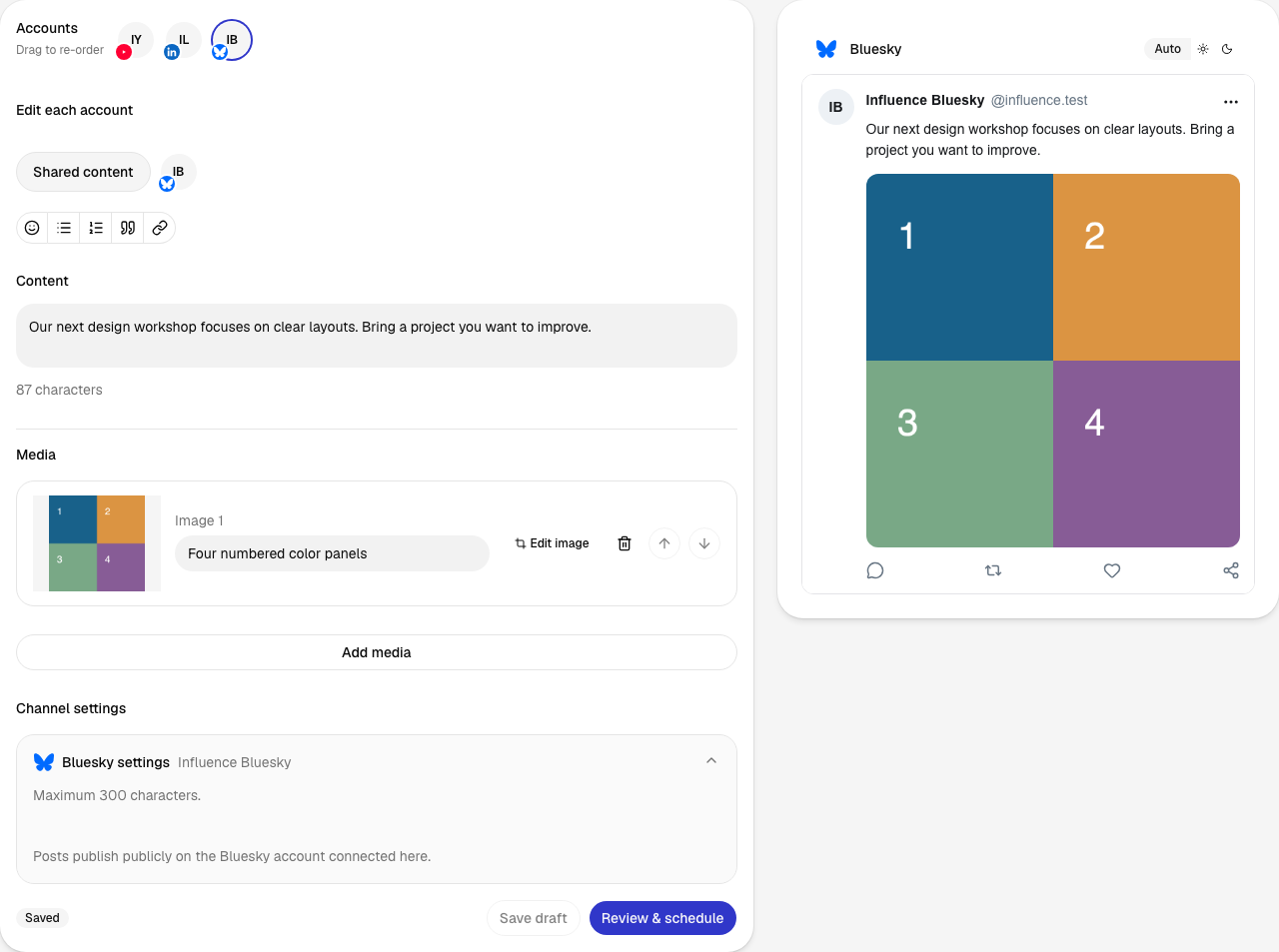
2. Review before approving
The review brings the account, post, date, time and time zone together. Confirm schedule saves this version for the chosen time.
Open full-size screenshot (new tab)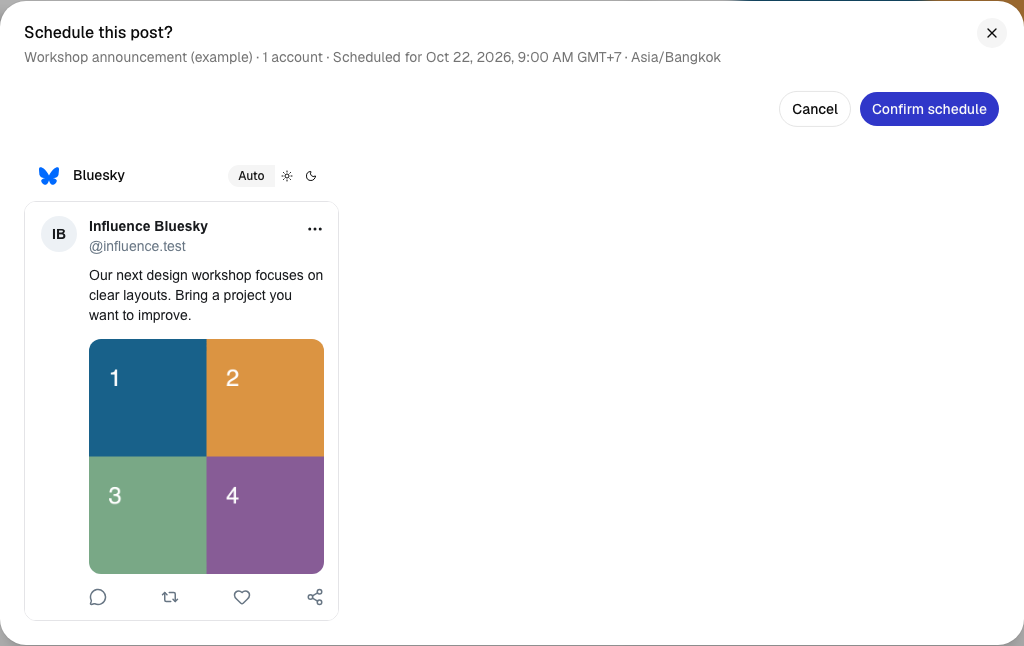
3. Find the scheduled post
The calendar shows when each post is due. Its status changes as publishing progresses; Activity shows the later delivery result.
Open full-size screenshot (new tab)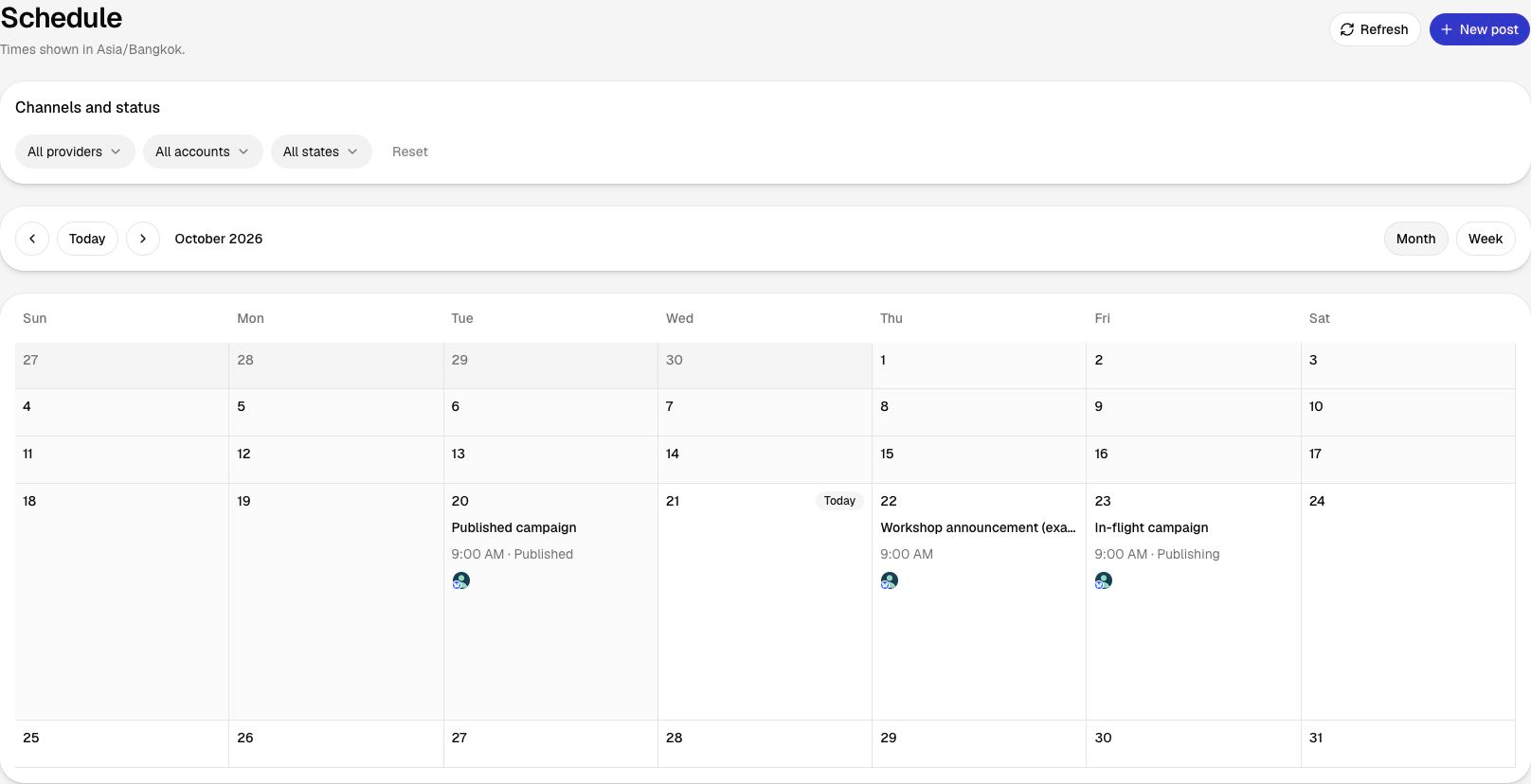
What carries over when you switch?
Keep the wider marketing calendar and its dependencies while moving the social posts.
- List upcoming social posts and non-social dependencies separately.
- Retain the recurring rules and evergreen library you still need.
- Recreate one approved social draft and verify its format and time zone.
- Give each future publication one scheduler and remove duplicates.
- Confirm delivery before moving the remaining suitable posts.
Project dependencies, campaign templates, ReQueue rules and historical reports do not transfer with a recreated post.
See the publishing workflow
The current signup requires a card before the seven-day trial. Charging starts after the trial under the selected plan's terms.
Questions before you switch
Can Influence replace the entire CoSchedule suite?
Influence handles social-content preparation and publishing. CoSchedule’s wider project planning and ReQueue rules need to stay in place or move to another tool.
Are X accounts included in the base profile allowance?
The current CoSchedule pricing page excludes X profiles from the base bundle and lists a separate $16 per profile per month.
Should I move ReQueue items as ordinary posts?
Only by replacing the recurring rule with separately scheduled posts. Influence’s assistant connection does not reproduce ReQueue rules.
CoSchedule: Sources and pricing
Prices and plan details were checked on the date above. The linked sources list each provider’s current terms.
- CoSchedule: Pricing and plan details ·
- Loomly: Pricing and plan details ·
- Planable: Pricing and plan details ·
- SocialBee: Pricing and plan details ·
Compare other tools
Related alternatives and their prices, features and switching considerations.